
Featured plugins
RÉGULA for WOOCOMMERCE
$59 /year
Advanced Shipping Rules for WooCommerce
Take full control of WooCommerce shipping with flexible rules built around the way your store actually works.
- Advanced WooCommerce shipping rules
- Automatic shipping calculation at checkout
- Category-based shipping conditions
- Clear and easy rule management
- Combine multiple shipping conditions
- Create any shipping rule combination
- Custom shipping costs per product
- Flexible rules for complex delivery scenarios
- Percentage-based shipping costs
- Price and range-based shipping rules
- Replace standard WooCommerce shipping methods
- Shipping costs by product or variation
- Works automatically with WooCommerce
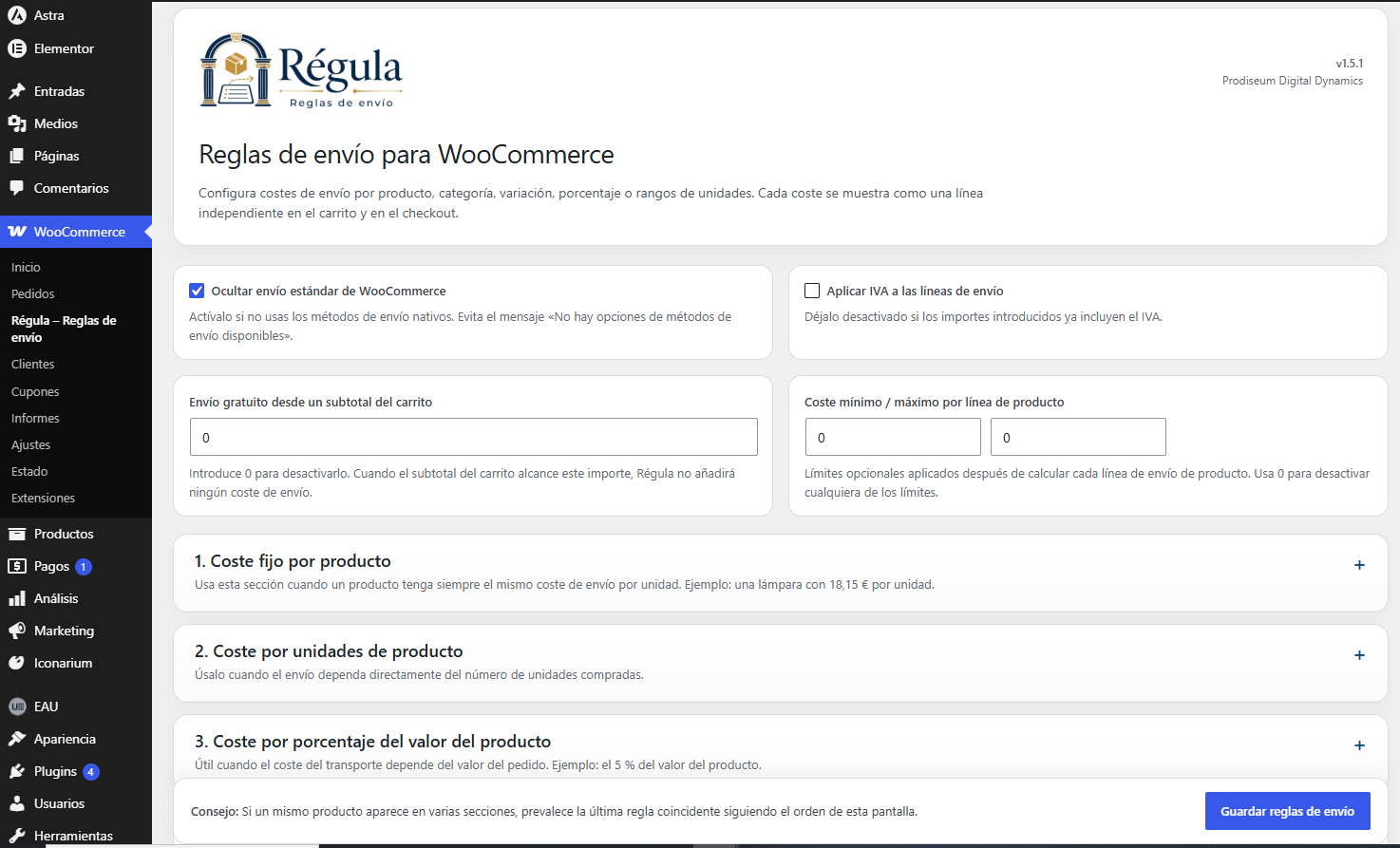
PRODUCT & QUANTITY
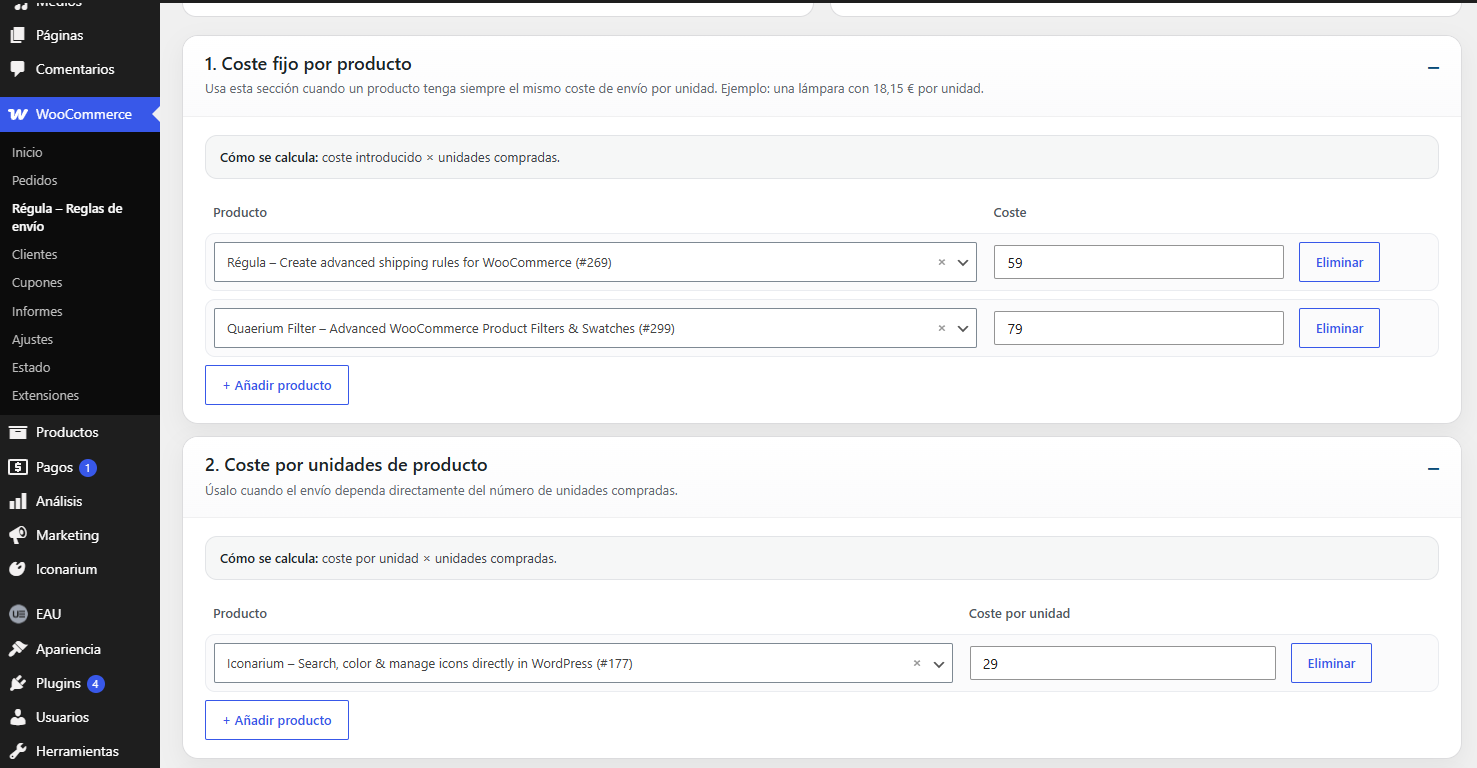
01 · Fixed cost per product
Set a fixed shipping cost for a specific product.
*Example: €18.15 × 3 units → €54.45
02 · Cost per product unit
Define exactly how much shipping costs for each unit purchased.
Ideal when transport cost scales directly with quantity.
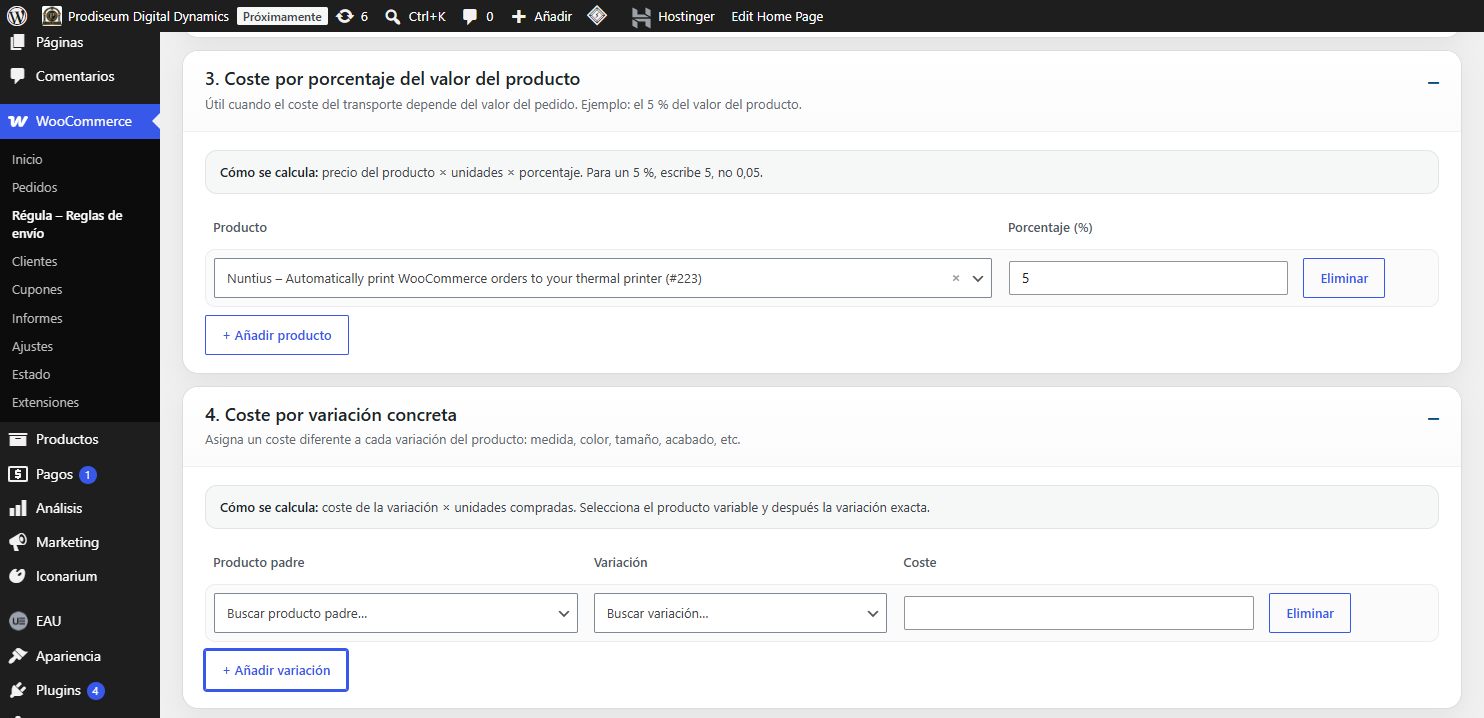
03 · Percentage-based cost
Calculate shipping as a percentage of the purchased product value.
*Example: Shipping = 5% of price × quantity
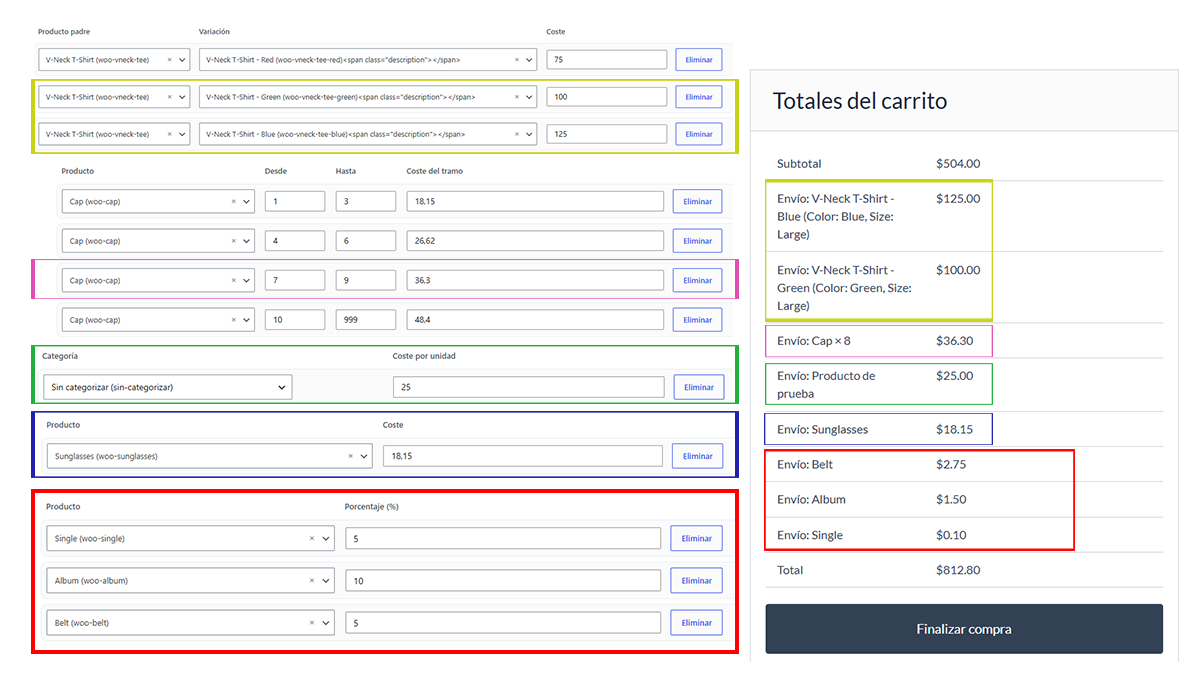
04 · Cost by variation
Give each product variation its own shipping cost.
*Example: Small €50 · Medium €75 · Large €100
05 · Cost by quantity ranges
Set a total shipping price according to the quantity purchased.
*Example:
1–3 → €18.15
4–6 → €26.62
7–9 → €36.30
10+ → €48.40
06 · Fixed cost by category
Assign a shipping rate to an entire WooCommerce category.
Products without a more specific rule can inherit the category configuration.
WEIGHT, SIZE & UNIT LOGIC
07 · Weight ranges
Set different shipping costs according to the total product or shipment weight.
08 · Volume & dimension ranges
Calculate shipping according to product volume or dimensional ranges.
09 · First unit + additional units
Set one price for the first unit and another cost for each additional unit.
*Example: First unit €20 · Additional units €5 each
CART & DESTINATION
10 · Cart subtotal ranges
Change shipping costs according to the total value of the customer’s cart.
11 · Destination-based rules
Create different shipping rules by country, state/province or postal code.
Country · State / Province · Postal Code
SHIPPING COST CONTROLS
12 · Free shipping threshold
Automatically offer free shipping when the configured order value is reached.
13 · Minimum & maximum cost per line
Set lower and upper limits to prevent individual shipping lines from becoming too low or too expensive.
PRODUCT & QUANTITY
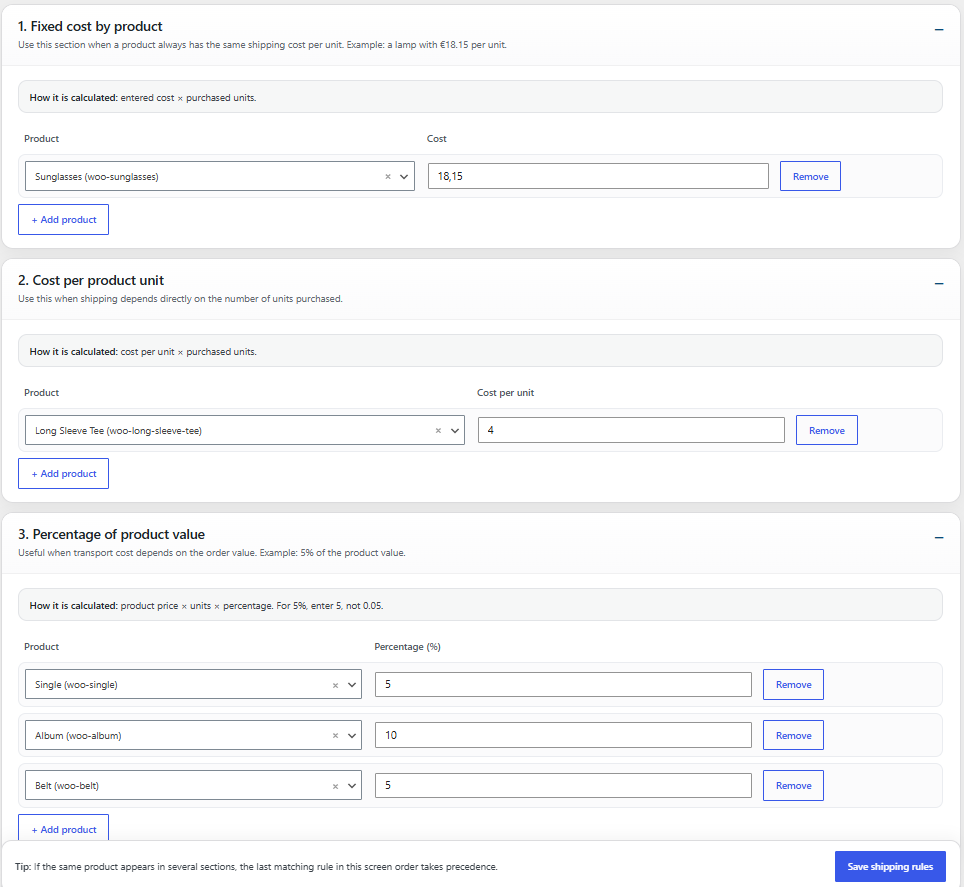
01 · Fixed cost per product
Set a fixed shipping cost for a specific product.
*Example: €18.15 × 3 units → €54.45
02 · Cost per product unit
Define exactly how much shipping costs for each unit purchased.
Ideal when transport cost scales directly with quantity.
03 · Percentage-based cost
Calculate shipping as a percentage of the purchased product value.
*Example: Shipping = 5% of price × quantity
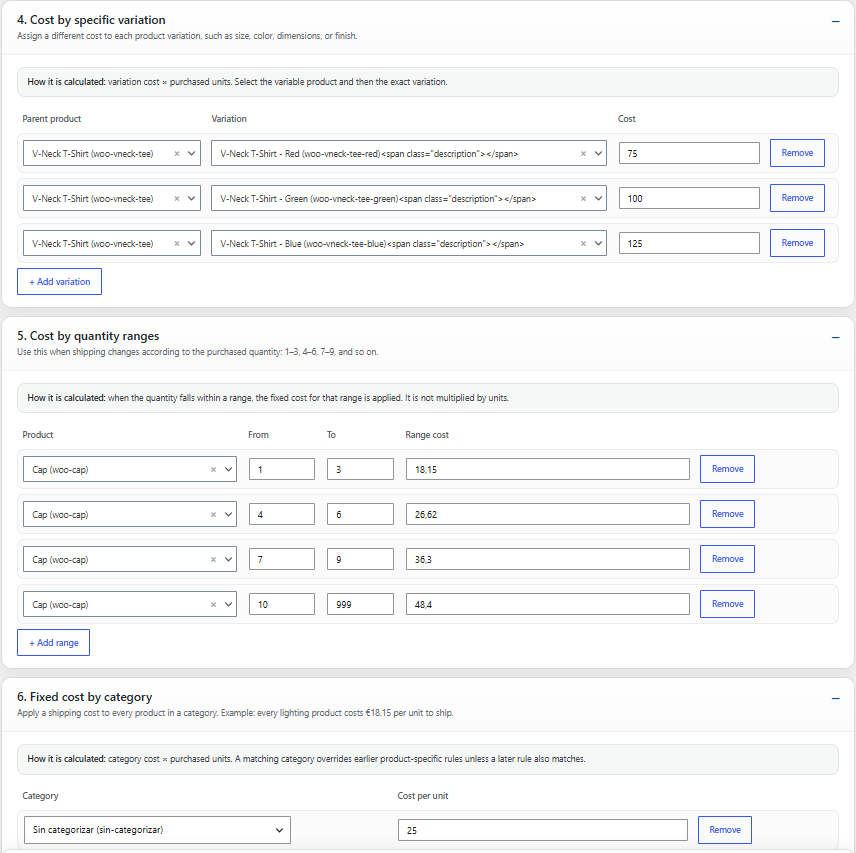
04 · Cost by variation
Give each product variation its own shipping cost.
*Example: Small €50 · Medium €75 · Large €100
05 · Cost by quantity ranges
Set a total shipping price according to the quantity purchased.
*Example:
1–3 → €18.15
4–6 → €26.62
7–9 → €36.30
10+ → €48.40
06 · Fixed cost by category
Assign a shipping rate to an entire WooCommerce category.
Products without a more specific rule can inherit the category configuration.
WEIGHT, SIZE & UNIT LOGIC
07 · Weight ranges
Set different shipping costs according to the total product or shipment weight.
08 · Volume & dimension ranges
Calculate shipping according to product volume or dimensional ranges.
09 · First unit + additional units
Set one price for the first unit and another cost for each additional unit.
*Example: First unit €20 · Additional units €5 each
CART & DESTINATION
10 · Cart subtotal ranges
Change shipping costs according to the total value of the customer’s cart.
11 · Destination-based rules
Create different shipping rules by country, state/province or postal code.
Country · State / Province · Postal Code
SHIPPING COST CONTROLS
12 · Free shipping threshold
Automatically offer free shipping when the configured order value is reached.
13 · Minimum & maximum cost per line
Set lower and upper limits to prevent individual shipping lines from becoming too low or too expensive.

Product-Based Shipping
Define different shipping costs for individual products.

Variation Rules
Apply specific shipping logic to product variations.

Flexible Calculations
Use fixed costs, percentages and configurable ranges.

Combine Your Rules
Create virtually any shipping rule combination.

Automatic Checkout
Régula calculates the correct shipping cost automatically.
TECHNICAL SPECIFICATIONS
Flexible shipping logic, built for WooCommerce

WooCommerce
Native integration
Products
Individual rules
Variations
Specific conditions
Categories
Category rules
Fixed Costs
Supported
Percentages
Dynamic calculations
Ranges
Configurable pricing
Checkout
Automatic calculation
Rule Combinations
Flexible logic
TECHNICAL SPECIFICATIONS
Flexible shipping logic, built for WooCommerce
WooCommerce
Native integration
Products
Individual rules
Variations
Specific conditions
Categories
Category rules
Fixed Costs
Supported
Percentages
Dynamic calculations
Ranges
Configurable pricing
Checkout
Automatic calculation
Rule Combinations
Flexible logic
SHIPPING RULES
Create shipping rules that match your real business
Standard WooCommerce shipping methods work well for simple stores. Régula is designed for everything that goes beyond that. Create specific rules according to the products being purchased and control how shipping costs are calculated for different situations.
- Shipping rules by product
- Rules for individual variations
- Category-based conditions
- Fixed shipping costs
- Flexible rule combinations
- Centralized rule management
Your shipping rules, your way
FLEXIBLE CALCULATIONS
Calculate shipping with fixed costs, percentages and ranges
Different products often require completely different shipping logic. Régula gives you the flexibility to create calculations that reflect the real cost of delivering each type of product. Set fixed amounts, percentage-based costs or pricing ranges and let WooCommerce calculate the result automatically.
- Fixed shipping amounts
- Percentage-based calculations
- Configurable price ranges
- Different costs for different products
- Flexible conditions for complex catalogs
- Automatic calculation at checkout
Shipping costs that adapt to every order
RULE COMBINATIONS
Create virtually any shipping combination you can imagine
Combine multiple conditions to build shipping logic for stores with very different products, delivery requirements and pricing structures. Régula is particularly useful when a single order contains products that normally require different shipping calculations.
- Combine multiple shipping rules
- Mix products with different shipping conditions
- Handle complex delivery scenarios
- Apply rules automatically
- Keep configurations organized
- Scale your rules as your catalog grows
All the combinations your store needs
CHECKOUT INTEGRATION
Show clear shipping costs directly at checkout
Once your rules are configured, Régula handles the calculations automatically. Customers see the applicable shipping costs directly in WooCommerce checkout without having to understand the logic behind them. The plugin can manage shipping at product level, giving you much more control than a single generic shipping method.
- Automatic WooCommerce checkout calculation
- Shipping costs associated with individual products
- Clear shipping information for customers
- No manual calculation required
- Replaces unsuitable standard shipping methods
- Works automatically once configured
From complex rules to a simple checkout
FREE vs PRO
Choose the shipping control your store needs
Start with essential shipping rules for simpler WooCommerce stores, or unlock Régula Pro for advanced conditions, flexible calculations and complex rule combinations.
FULL SHIPPING CONTROL
FEWER LIMITS
| Feature | Free | ♛ Pro |
|---|---|---|
| Core Shipping Rules | ||
| Native WooCommerce integration | ✓ | ✓ |
| Product-based shipping rules | ✓ | ✓ |
| Category-based shipping rules | ✓ | ✓ |
| Fixed shipping costs | ✓ | ✓ |
| Variation-specific shipping rules | × | ✓ |
| Shipping Calculations | ||
| Fixed amount calculation | ✓ | ✓ |
| Percentage-based shipping costs | × | ✓ |
| Price-range shipping rules | × | ✓ |
| Different calculations for different products | Basic | Advanced |
| Advanced Rule Logic | ||
| Combine multiple shipping conditions | × | ✓ |
| Mix products with different shipping rules | × | ✓ |
| Multiple rules in the same order | × | ✓ |
| Complex shipping combinations | × | ✓ |
| Advanced rule priorities | × | ✓ |
| Checkout & Management | ||
| Automatic calculation at checkout | ✓ | ✓ |
| Shipping costs displayed per product | ✓ | ✓ |
| Replace standard WooCommerce shipping methods | ✓ | ✓ |
| Centralized shipping rule management | ✓ | ✓ |
| Advanced rule configuration | Basic | Full |
Complete your kit...

Iconarium – Search, color & manage icons directly in WordPress
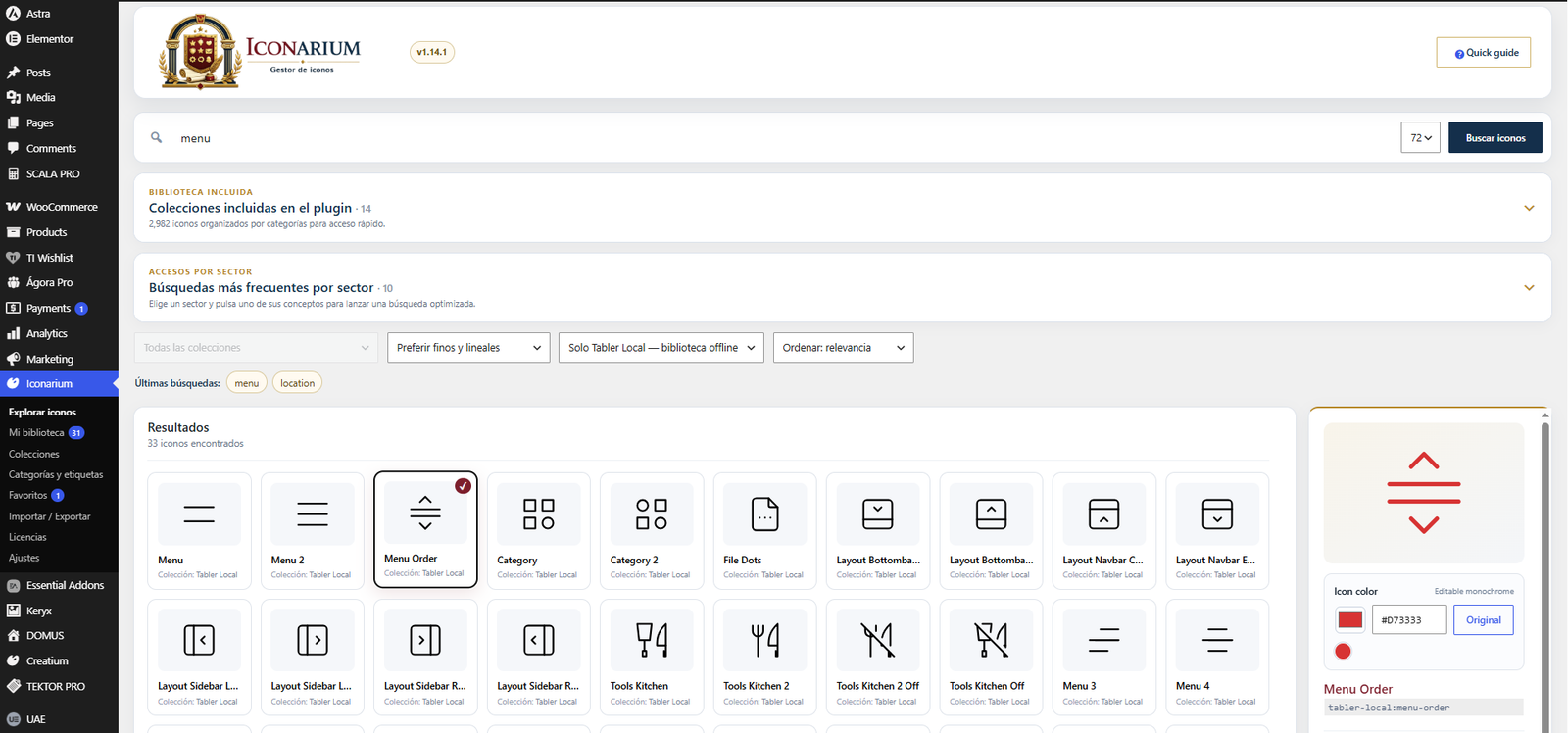
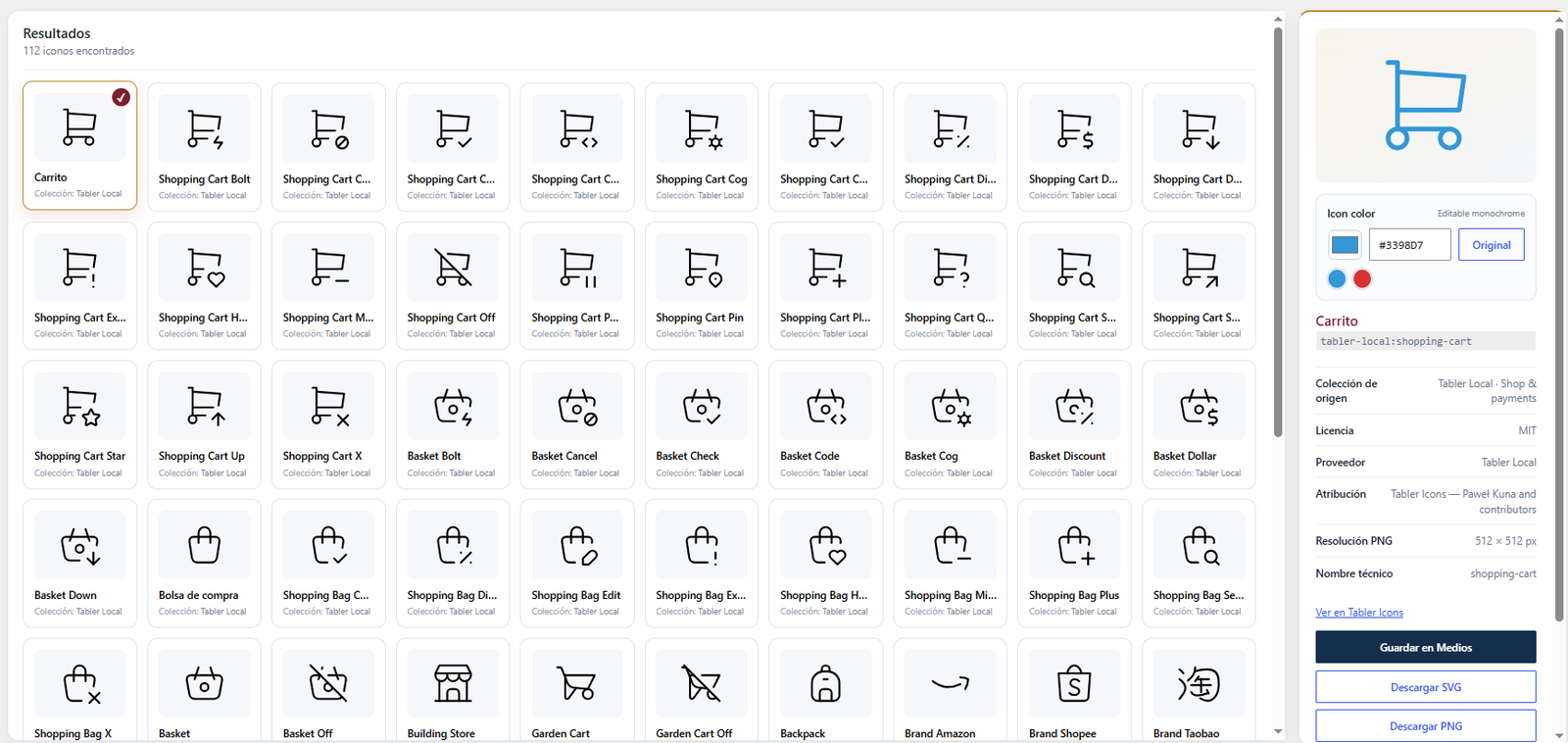
Search, color and manage thousands of icons directly from WordPress with Iconarium. Find the icon you need without leaving the dashboard, customize its color to match your website or brand, organize it into reusable collections, and save it directly to the WordPress Media Library.
- All in the WordPress dashboard
- Iconify integration
- Color and customize your icons
- Create and manage custom collections

Keryx – Create & customize banners directly in WordPress
Create professional banners directly from your WordPress dashboard with Keryx. Search images from Pexels and Pixabay, customize the composition with text, buttons, overlays and gradients, and adapt every element to match your website or brand.
- All in the WordPress dashboard
- Search images directly in WordPress
- Pexels & Pixabay integration
- Adjust image position and composition

Nuntius – Automatically print WooCommerce orders to your thermal printer
Automatically send and print WooCommerce orders on a thermal printer with Nuntius. Connect your WordPress store to the Nuntius Windows app and receive new orders directly at your local printer without having to open the WooCommerce dashboard or print them manually.
- Auto customer and order data printing
- Print new orders in real time
- Dedicated Windows desktop app
- Designed for restaurants and takeaway

Quaerium Filter – Advanced WooCommerce Product Filters & Swatches
Create fast, flexible and visually consistent product filters for WooCommerce with Quaerium Filter. Let customers narrow down products by categories, subcategories, attributes, tags, brands, price and availability through a clean filtering interface designed to work naturally with modern WooCommerce stores.
- Product Filters + Variation Swatches in One Plugin
- Color swatches & visual attribute selectors
- Filter by categories + tags + brands & attributes
- Vertical & horizontal filter layouts